
PLATFORM / CLIENT PORTAL

Their portal, not another emailed PDF.

Your clients log into a branded, scoped portal (SSO or magic link), no shared PDFs over email. Critical and High findings auto-disclose the moment they are confirmed, and clients raise disputes, evidence, and retest requests without ever leaving it.

acme.cairnsecurity.com/portal
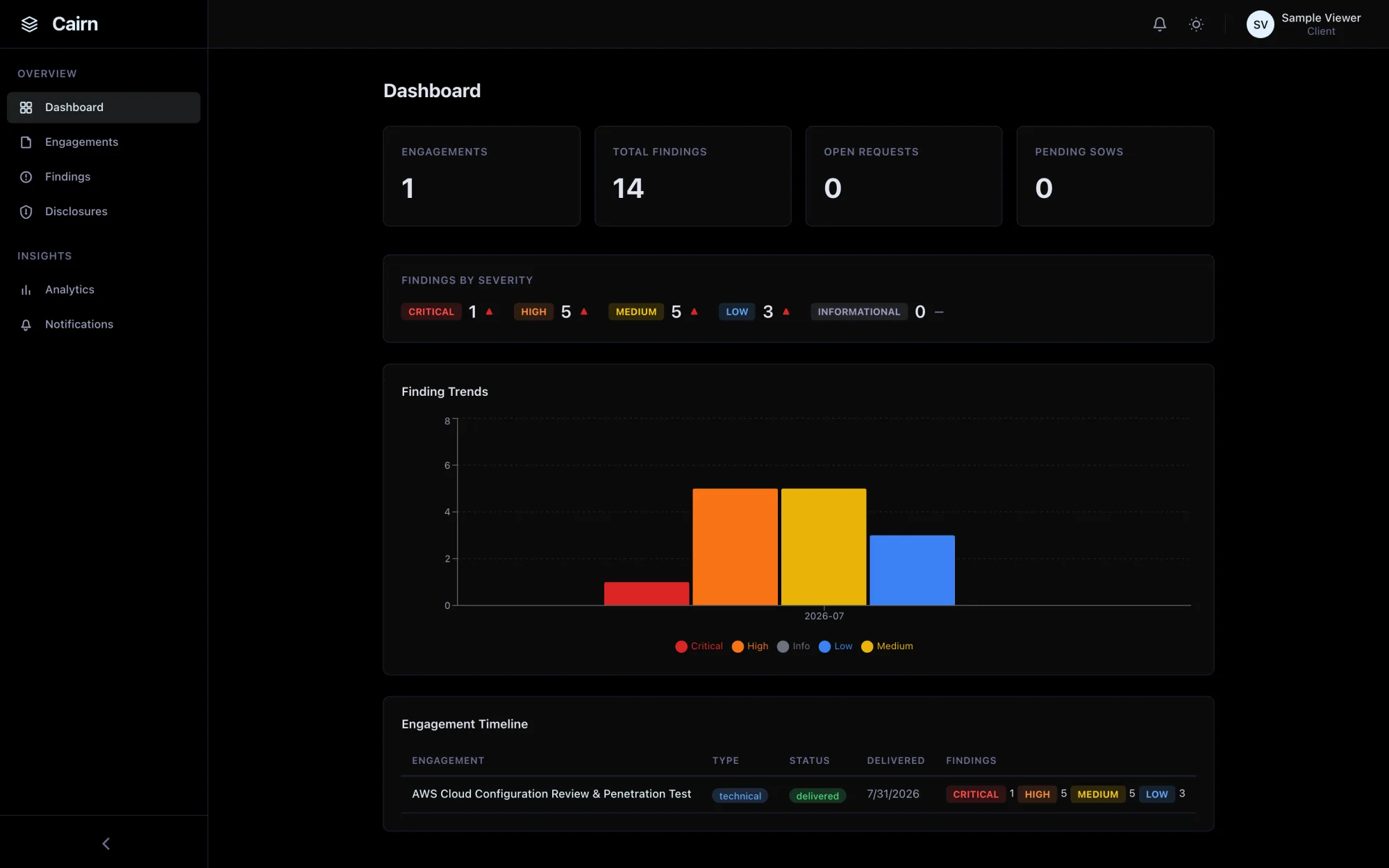
Client portal dashboard: engagements, findings by severity, and finding trends
What the portal does

The delivery half, as polished as the authoring half.

A report is only as good as how it lands. The Client Portal gives every client a secure, branded home for their findings, disclosed automatically on delivery, scoped to just their engagements, and wired for the back-and-forth that follows: disputes, evidence, and retests.

  • Scoped sign-in: SSO (OIDC / SAML), magic link, or password
  • Clients only ever see the engagements and findings that are theirs
  • Per-org white-label branding: logo, colors, fonts, custom domain
  • Per-org SMTP with AES-256-GCM encrypted credentials
  • Auto-disclosure of Critical and High findings on report delivery
  • Client request workflow: disputes, amendments, evidence, inquiries
  • Client-initiated retest requests with admin review and scheduling
  • Per-finding remediation status and full retest history
Why it’s different

Not a PDF drop-box. A real client surface.

Branded, access-scoped, and automated, so delivery is a moment in the workflow, not a manual email with an attachment.

Scoped access

Every client sees only their own work.

A separate client role, enforced at the middleware layer on every query, so a portal user can never reach another client’s data. Sign in by SSO (OIDC or SAML), single-use magic link, or password. Tokens are hashed, cookies are httpOnly, endpoints are rate-limited.

  • SSO · magic link · password
  • Middleware-enforced scoping
  • Hashed tokens, httpOnly cookies
White-label

It looks like your shop, not ours.

Per-org branding drives the logo, favicon, fonts, and full light/dark color set, with custom-domain support and DNS verification. Clients land on a portal that carries your name end to end. No “powered by” footer.

  • Logo · fonts · color themes
  • Custom domain + DNS verify
  • Light / dark
Auto-disclosure

Critical findings surface on delivery.

The moment a report is delivered, every undisclosed Critical and High finding is released to the client in the portal. Configure your own SMTP and a notification goes out over it too, from your domain, with credentials encrypted at rest using AES-256-GCM. Disclose any finding by hand too. No manual “I’ll email you the highlights.”

  • Crit / High on delivery
  • Bring your own SMTP
  • Encrypted credentials (AES-256-GCM)
Client requests

Disputes and retests, in one place.

Clients raise severity disputes, amendment requests, remediation evidence, and general inquiries, each routed to your team for review, with status tracking and attachments. Retest requests flow through the same review-and-schedule workflow.

  • Dispute · amend · evidence
  • Admin review + status
  • Client-initiated retests
On delivery

What happens the moment you deliver a report.

Delivering a report fans out automatically to disclosure and in-portal notification, and to email once you have configured your own SMTP.

  1. 01Report delivered
  2. 02Crit / High disclosed
  3. 03Client notified
  4. 04Retest requested

See the handoff from the client’s side.

The product tour steps through the branded portal, auto-disclosed findings, and the request workflow as a client sees them. Or book a live walkthrough.

FAQ

Questions we get about the portal.

How much of the portal can we brand?

Logo, favicon, fonts, and the full light/dark color set are per-org, and you can serve the portal on your own custom domain with DNS verification. Clients see your brand throughout. There is no Cairn “powered by” footer.

Can a client ever see another client’s findings?

No. Client accounts carry a distinct role and are scoped to specific clients at the middleware layer, so every query is filtered before it runs. Access is granted per client and enforced on every request.

What email address do disclosure notices come from?

Yours, and only yours. Cairn does not send mail on your behalf: configure per-org SMTP and disclosure emails and invites send from your own domain, with credentials stored encrypted at rest with AES-256-GCM. Until you configure SMTP, no email is sent — the in-app half of disclosure still runs, so findings are released in the portal and the client sees them on sign-in.

How do clients ask for a retest?

From inside the portal. A client raises a retest request against resolved findings; your team reviews, approves, and schedules it, and the client sees the retest status and history against each finding.