
PLATFORM / REPORT

Author and deliver the report without fighting a Word template.

Cairn Report imports findings from 40 scanner and tool formats, dedupes them against your library, gives every reviewer track changes inside a real workflow, and exports to DOCX or PDF from templates you control, with AI drafting that can run entirely on-prem.

platform.cairnsecurity.com/reports
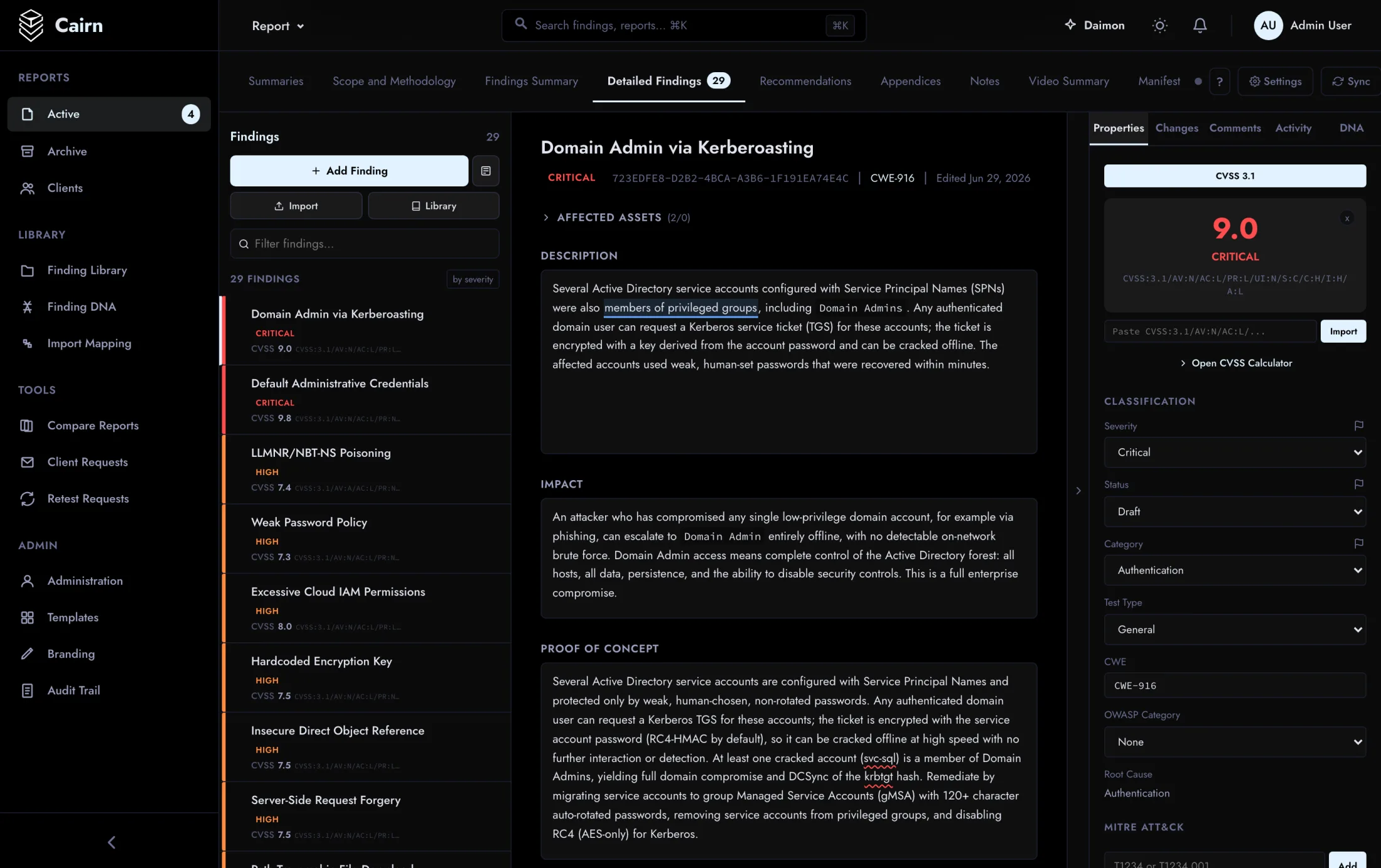
Report editor showing a full finding with description, impact, and proof-of-concept
What Report does

From raw scanner output to a signed-off deliverable.

Report is where the engagement becomes the artifact your client actually reads. It ingests findings from the whole toolchain, standardizes them against your library, runs them through a real review workflow, and renders a document in your template, then hands it to the Client Portal for delivery.

  • Import from 40 scanner and tool formats including generic CSV/JSON, with format auto-detection
  • Reusable findings library: global defaults and per-org templates
  • Collaborative authoring with track changes, inline comments, and section locking
  • Custom DOCX template engine and Gotenberg-powered PDF export
  • Retest cycles with per-finding status, trending, and auto-generated checklists
  • Custom fields, flash reports, executive summaries, and appendices
  • Ticketing sync: Jira, ServiceNow, GitHub, Azure DevOps, Linear
  • AI drafting across Ollama, OpenAI, and Anthropic, on-prem when you need it
Why it’s different

The reporting depth pentesters keep asking for.

Not a template filler. A findings model, a review engine, a retest tracker, and an on-prem AI layer, built by people who write these reports for a living.

40 formats

One findings model, every scanner.

Drop in output from 30-plus tools (Burp, Nessus, Nmap, Nuclei, Semgrep, Qualys, Trivy, ZAP and more), plus generic CSV/JSON. Format auto-detection sniffs the file and routes it to the right parser; findings dedupe against your library on import.

  • Content auto-detection
  • Library matching on import
  • CSV / JSON fallback
Findings library

Write a finding once, reuse it everywhere.

A tiered library (Cairn-global defaults plus your own org-private and community templates), so recurring findings carry consistent language, CVSS, and remediation. Import matching maps scanner output straight onto your template.

  • Global + per-org tiers
  • Consistent CVSS + remediation
  • Bulk CSV / OPF import
Review workflow

Real track changes, not a shared doc.

Every reviewer edits inside a real workflow: change marks, inline comment threads, and snapshot diffing against the version review started from. Section locking keeps two people out of the same field. Accept or reject each change, gate by role.

  • Snapshot diff + accept/reject
  • Section locking
  • Role-gated review
Retest cycles

Retests with a trend line.

Per-finding retest status (resolved, partial, not resolved, new) with remediation history and cross-report trending, plus verification checklists generated automatically from each finding’s evidence. Clients see the delta, not a fresh report.

  • Per-finding status + history
  • Cross-report trending
  • Auto-generated checklists
Correlation graph

See the findings as a graph.

A force-directed map linking findings that share a CWE, an asset, a MITRE ATT&CK technique, a CVE, or a category, so systemic issues surface instead of hiding in a 200-row table. Nodes colored by severity.

  • CWE / asset / ATT&CK / CVE edges
  • Severity-colored nodes
  • Interactive
AI drafting

AI drafting that never leaves your network.

Draft finding descriptions, impact, remediation, and executive summaries with an assistant that matches your library’s voice, running on OpenAI, Anthropic, or a local Ollama model on-prem, so sensitive findings never touch a third-party cloud. Every suggestion is human-approved.

  • On-prem via Ollama
  • Library style-matching
  • Human-in-the-loop approval
Status pipeline

Every report moves through eight tracked states.

Draft to delivered, with a tech and ops review gate before anything reaches the client. Each transition is recorded in an append-only history.

  1. 01Draft
  2. 02In progress
  3. 03Tech review
  4. 04Ops review
  5. 05In review
  6. 06Approved
  7. 07Ready
  8. 08Delivered

Import a scan and watch the report build itself.

In the product tour, see a scan import, dedupe against the library, and export a DOCX in your template. Or book a live session and we’ll drive it.

FAQ

Questions we get about Reporting.

Can I use my own report template?

Yes. The DOCX template engine renders your Word template (cover page, numbering, dynamic risk shading, appendices), so exports come out in your house style, not ours. PDF is produced from the same template via Gotenberg.

Does the AI send our findings to a third-party cloud?

Only if you choose to. The AI layer runs across Ollama, OpenAI, Anthropic, Azure, and Bedrock with per-org configuration. Point it at a local Ollama model and drafting happens entirely on-prem. Sensitive findings never leave your environment.

How does it handle two people editing the same report?

Live presence shows who is where, and section-level locking keeps two people out of the same field while both work the report in parallel. Every reviewer’s changes are tracked and individually accepted or rejected before approval.

Can it pull from our CWE / CVE feed and our scanners?

Findings carry CWE, CVE, and MITRE ATT&CK references, and import from 40 scanner and tool formats including generic CSV/JSON. Ticketing sync (Jira, ServiceNow, GitHub, Azure DevOps, Linear) push confirmed findings out to your tracker.